# Integrating REST API in ReactJS with fetch & useEffect
Integrating API in a React Project can be easily done by achieving simple project structure. Let’s see how to integrate an API in a React Project.
We will be building an App to List Current Rates and Currency Convertor using Frankfurter API [https://www.frankfurter.app/](https://www.frankfurter.app/).
You can use any API, I found this one listed [over here: GitHub - public-apis/public-apis: A collective list of free APIs for use](https://github.com/public-apis/public-apis#currency-exchange)
Let’s get started by setting up a project with `[create-react-app](https://github.com/facebook/create-react-app)`.
```sh
npx create-react-app forex-app
cd forex-app
yarn start
```
This will initialize a new React App named `forex-app`, start the local development server on port `3000` and open the URL `http://localhost:3000` on the default Browser.
We will use following design for our UI: (many parts of it)
[Foreign Currency Rates and Convertor Mobile App by Tim on Dribbble](https://dribbble.com/shots/8780358-Foreign-Currency-Rates-and-Converter-Mobile-App)
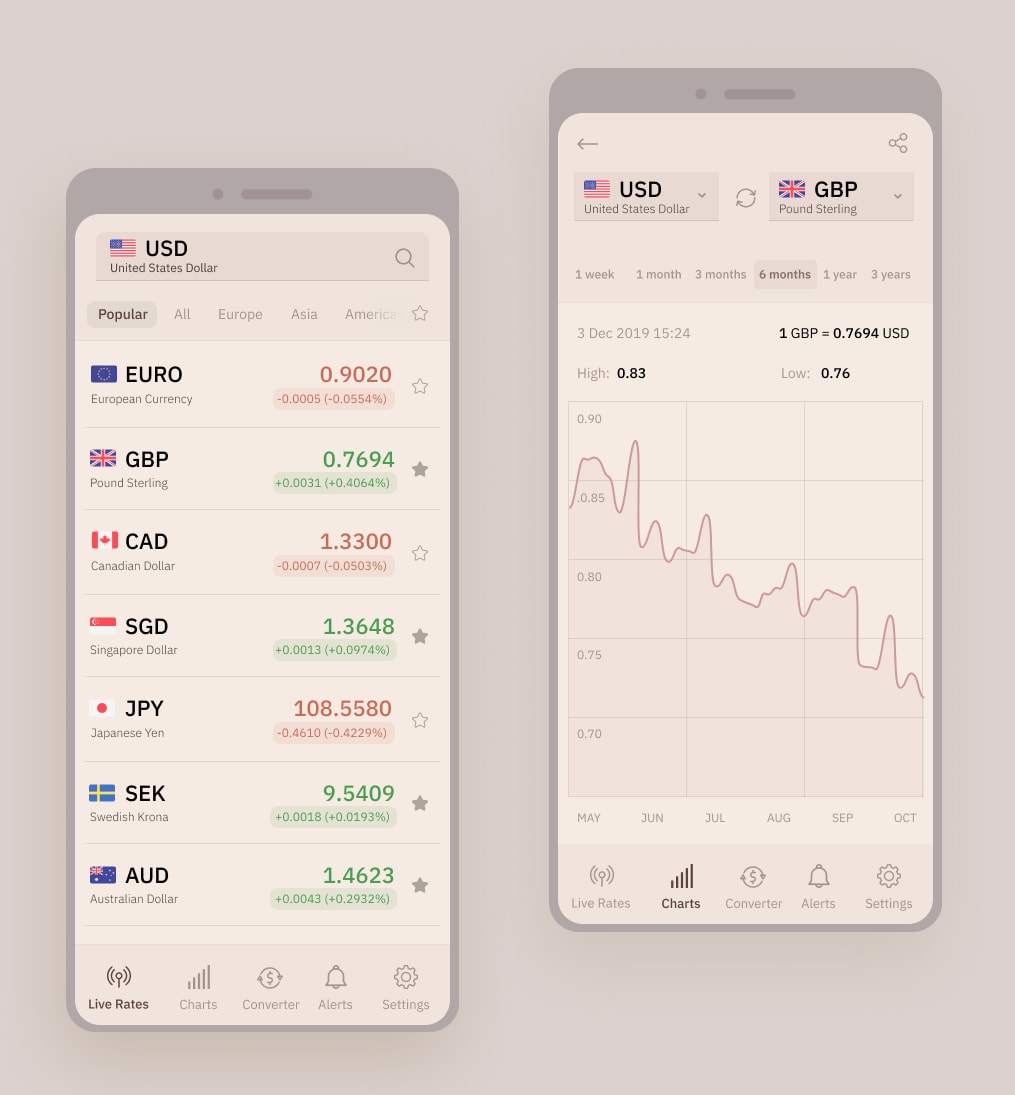
The design proposes the use of Country Flags for currency symbols
As we can see in above design, there is a list of rates for the preferred currency. We will make this screen working in our design. Let’s add the screen to list the currency exchange rates for a base currency.
The API response structure for the Rates is as follows:
```json
{
"amount": 1,
"base": "USD",
"date": "2020-05-08",
"rates": {
"AUD": 1.5321,
"BGN": 1.8037,
"BRL": 5.817,
"...": ...
}
}
```
For above response, following React Component will display the rates:
```jsx
import * as React from "react";
import "./RateList.css";
const Amount = ({ amount, rate }) => {
const _rate = Number(rate);
return (
{(amount ? _rate * amount : _rate).toFixed(5)}
);
};
const CurrencyFlag = ({ currency }) => (
);
const CSymbol = ({ currency }) => (
{currency.toUpperCase()}
);
const display = (currency, reverse) => [
,
,
];
const Currency = ({ currency = "usd" }) => (
);
```
And apart from the list, we will need the component to select our preferred currency and set a base amount to convert. Following component will be responsible for that:
```jsx
import * as React from "react";
import "./CurrencySelector.css";
import { CurrencyFlag } from "../CurrencyFlag";
const currencies = ["EUR", "USD", "GBP"];
const CurrencyFlag = ({ currency }) => (
);
const CurrencySelector = ({ currency = "usd", onChangeCurrency }) => (
);
}
export default App;
```
Now to fetch the rates from API we will use fetch and following will be our function to handle all the GET requests:
```js
const baseUrl = "//api.frankfurter.app";
const request = (_url, method = "GET", body = "") => {
const url = `${baseUrl}${_url}`;
const headers = new Headers();
headers.append("Content-Type", "application/json");
const params = {
method,
headers: headers,
};
if (["POST", "PUT"].includes(method)) {
params.body = typeof body !== "string" ? JSON.stringify(body) : body;
}
const request = new Request(url, params);
return fetch(request).then((response) => {
const { status, headers } = response;
if (status === 204 || headers.get("Content-Length") === 0) {
return {};
}
return response.json();
});
};
export const getData = (url) => request(url, "GET");
export const postData = (url, data) => request(url, "POST", data);
export const putData = (url, data) => request(url, "PUT", data);
export const deleteData = (url) => request(url, "DELETE");
export default {
get: getData,
post: postData,
put: putData,
delete: deleteData,
};
```
With all the necessary pieces in place, we will integrate the API call with `getData` function in the `App` Component with the following function and it will be chained to update the state in the Component:
```jsx
const getRates = (currency) => getData(
`/latest?from=${currency}`
).then(({ rates }) =>
setState((currentState) => ({
...currentState,
rates,
}))
);
```
And we will use the React's `useEffect` hook to execute the initial fetch call:
```jsx
useEffect(() => {
getRates(state.currency);
}, []);
```
This will call the API for Rates with fetch on the first call. But we want to fetch rates for any change in the Currency.
As we are already updating the state in the Change Handler of `select`, we just need to make it; currency from state; a dependency of `useEffect`.
In this way, any changes to the dependency will trigger re-execution of the `useEffect` hook. The following code will do that:
```js
const App = () => {
const [state, setState] = useState({
rates: {},
amount: 1,
currency: "USD",
});
...
useEffect(() => {
getRates(state.currency);
}, [state.currency]);
...
return (...);
}
```
Now, if we want to make sure of newest rates for conversion of amount as well, we will need the following changes to the `getRates` function and `useEffect` hook alonf with the change handlers to update the amount in state:
```jsx
const App = () => {
const [state, setState] = useState({
rates: {},
amount: 1,
currency: "USD",
});
...
const getRates = (currency, amount = 1) => getData(
`/latest?from=${currency}&amount=${amount}`
).then(({ rates }) =>
setState((currentState) => ({
...currentState,
rates,
}))
);
useEffect(() => {
getRates(state.currency, state.amount);
}, [state.currency, state.amount]);
...
return (...);
}
```
You can play with the Code and demo at the following links:
[Github Repo](https://github.com/pankajpatel/forex-app/) [Demo](https://pankaj.pro/forex-app/)
---
## Conclusion
Here we saw the following things:
- Starting React app with create-react-app
- Using Hooks to maintain state with `useState`
- Using `fetch` in React Project
- `useEffect` for reacting to state changes and make API requests
How do you call APIs in your React project?
Let me know through comments 💬 or on Twitter at [@patelpankaj](https://twitter.com/patel_pankaj_) and [@time2hack](https://twitter.com/time2hack)
If you find this article helpful, please share it with others 🗣
Subscribe to the blog to receive new posts right to your inbox.
---
## Credits
- Photo by [Ferenc Almasi](https://unsplash.com/@flowforfrank?utm_source=unsplash&utm_medium=referral&utm_content=creditCopyText) on [Unsplash](https://unsplash.com/s/photos/react?utm_source=unsplash&utm_medium=referral&utm_content=creditCopyText)
- Icons from Icon8 via [Lunacy](https://icons8.com/lunacy)
---
Originally published at [https://time2hack.com](https://time2hack.com/integrating-rest-api-react-js-fetch-useeffect-hook/) on May 11, 2020.